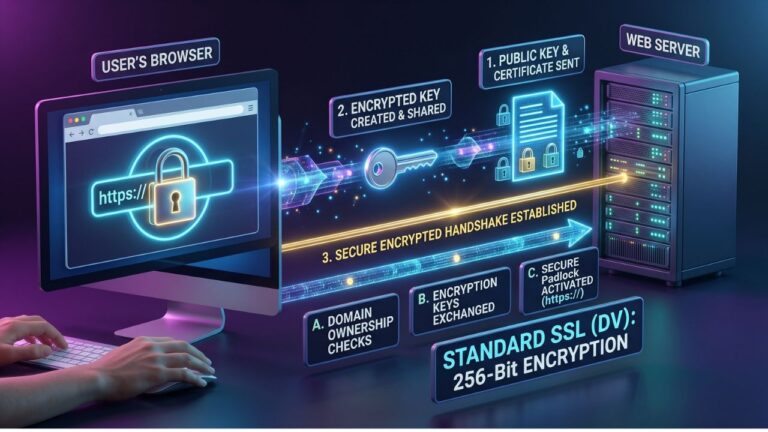
Website security is an essential consideration for businesses, bloggers, online stores, and organizations that communicate with visitors over the internet. Whenever someone opens a website, submits a contact form, signs into an account, or completes an online purchase, information travels between their browser and the website’s server. Protecting that communication is important for privacy and reliable online operations. A Standard SSL certificate helps establish an encrypted HTTPS connection, allowing browsers and web servers to exchange information using modern Transport Layer Security technology.
Many website owners encounter SSL certificates when purchasing hosting, registering a domain, or launching a new website. Some hosting companies include certificates automatically, while others offer separate free and paid options.
This can create confusion about what a standard certificate actually provides, whether a paid product is necessary, and how SSL differs from other website security measures.
A standard certificate generally refers to a basic Domain Validation certificate, although providers may use the term differently for specific products.
Domain Validation certificates confirm control of a domain name rather than independently verifying the identity or trustworthiness of the business operating the website.
Understanding this distinction is important because an encrypted website is not necessarily a safe or legitimate business.
This guide explains how standard SSL certificates work, why HTTPS matters, how to install and renew certificates, the differences between validation types, and the practical steps required to maintain secure website connections.
What Is a Standard SSL Certificate?
A Standard SSL certificate is commonly a Domain Validation, or DV, digital certificate used to enable HTTPS connections for websites and other compatible services.
The certificate is issued by a certificate authority after the applicant successfully demonstrates control of the relevant domain.
For example, a website operating at example.com may obtain a certificate that allows compatible browsers to establish an authenticated, encrypted connection to that domain.
The certificate contains information such as the domain names it covers, its validity period, the issuing certificate authority, and the public key associated with the certificate.
During a secure connection, the browser checks the certificate and participates in a TLS handshake with the server.
If the certificate is valid and the connection succeeds, HTTPS protects information exchanged over that connection.
Why Is It Called SSL?
SSL stands for Secure Sockets Layer.
However, modern websites use TLS, or Transport Layer Security, rather than the obsolete SSL protocols.
The expression SSL certificate remains common in website hosting and digital security marketing.
Does Standard SSL Verify the Business?
A typical DV certificate verifies domain control.
It does not establish that a particular business is legitimate, financially reliable, or trustworthy.
Users should consider other signals when evaluating a website.
How SSL and TLS Certificates Work
SSL certificates are part of the infrastructure used to secure internet connections.
The Browser Connects to the Server
A visitor enters a website address or follows a link.
When the website uses HTTPS, the browser initiates a secure connection.
The Server Presents Its Certificate
The server provides the relevant TLS certificate and supporting information.
The Browser Validates the Certificate
The browser checks whether the certificate is valid for the requested domain, whether it chains to an accepted trust anchor, and whether other required checks succeed.
Cryptographic Keys Are Established
Modern TLS handshakes establish shared cryptographic secrets used to protect the session.
The exact mechanism depends on the negotiated protocol and configuration.
Encrypted Communication Begins
Once the handshake succeeds, application data can be transmitted through the encrypted TLS connection.
What Does This Protect?
TLS helps protect data in transit against unauthorized reading and modification.
It does not automatically protect information after it reaches the application or prevent vulnerabilities in the website itself.
7 Essential Benefits of a Standard SSL Certificate
A correctly configured certificate provides several important benefits.
1. Encrypts Website Communication
HTTPS protects information exchanged between a browser and the website server.
This is important for account logins, forms, and other activities involving user information.
2. Supports Secure Login Sessions
Authentication credentials and session information should be transmitted through secure connections.
TLS is a fundamental part of this protection.
However, secure authentication also requires appropriate application design and session management.
3. Enables HTTPS
A valid certificate is essential for establishing trusted HTTPS connections in ordinary browser environments.
4. Helps Prevent Connection Tampering
TLS includes mechanisms designed to detect unauthorized modifications to data exchanged during a secure session.
5. Supports Modern Browser Functionality
Many browser features and APIs require secure contexts.
HTTPS is therefore important beyond basic encryption.
6. Provides Domain Authentication
A valid certificate helps the browser verify that the connection is associated with the requested domain according to the certificate trust system.
7. Creates a Foundation for Website Security
HTTPS supports secure communication, but it should be combined with software updates, access controls, backups, and other protective measures.
Standard SSL vs. Domain Validation SSL
The terms are often used interchangeably in commercial hosting environments.
Domain Validation
A DV certificate is issued after the applicant demonstrates control of the domain.
The certificate authority does not conduct the same level of organization identity verification associated with OV or EV certificates.
Standard SSL Product Labels
Some providers market their DV products as Standard SSL certificates.
Others use different names for similar certificate offerings.
Encryption Quality
The commercial label does not determine the strength of the encrypted connection.
Actual protection depends on the negotiated TLS protocol, server configuration, cryptographic algorithms, and implementation.
Choosing a Product
Review the certificate’s validation type and domain coverage rather than relying only on its product name.
Standard SSL vs. OV and EV Certificates
Publicly trusted TLS certificates are commonly discussed in three validation categories.
Domain Validation Certificates
DV certificates establish domain control.
They are often convenient for automated issuance and renewal.
They are widely used across websites of different sizes.
Organization Validation Certificates
OV certificates involve additional verification of the organization requesting the certificate.
Their organizational identity information is subject to relevant issuance requirements.
Extended Validation Certificates
EV certificates involve more extensive organization verification under applicable guidelines.
They are intended to provide additional identity assurance.
Do OV and EV Encrypt Data Better?
Not inherently.
A properly configured DV connection can use strong modern TLS just as an OV or EV connection can.
The main distinction is the identity information verified during certificate issuance.
Do EV Certificates Guarantee Trustworthiness?
No.
A certificate does not guarantee that a website is free from fraud, malware, or other risks.
Which Should You Choose?
For many ordinary websites, a suitable DV certificate is sufficient for HTTPS.
Organizations requiring verified identity information should evaluate OV or EV products according to their needs.
Single-Domain, Wildcard, and Multi-Domain Certificates
Certificate validation type is different from certificate domain coverage.
Single-Domain Certificate
A single-domain certificate covers the specific domain name or names included in its configuration.
For example, a certificate may cover example.com.
Whether www.example.com is also covered depends on the certificate’s Subject Alternative Names.
Wildcard Certificate
A wildcard certificate can cover a set of eligible subdomains.
For example, *.example.com generally covers a single subdomain level such as shop.example.com, but not the apex example.com unless it is separately included.
Multi-Domain Certificate
A multi-domain certificate includes multiple specified names in its Subject Alternative Names.
This can help organizations manage several websites or services.
Choosing Appropriate Coverage
Identify every hostname that needs HTTPS protection.
Verify that the issued certificate covers those exact names.
Free vs. Paid Standard SSL Certificates
Website owners often wonder whether they need a paid certificate.
Free SSL Certificates
Let’s Encrypt provides publicly trusted DV certificates without charging for issuance.
Many hosting providers automate certificate installation and renewal.
Paid SSL Certificates
Commercial certificate products may include additional customer support, managed services, organization validation, or other commercial features.
Encryption Differences
A paid DV certificate is not automatically more secure than a free DV certificate.
Both can support modern encrypted TLS connections when correctly configured.
Support Considerations
A paid managed service may be useful when a business needs particular support arrangements.
Renewal Automation
Automation is increasingly important because certificates have shorter validity periods.
Best Choice for Small Websites
For many blogs, portfolios, and ordinary business sites, a reliable free DV certificate with automated renewal is a practical choice.
Standard SSL Certificate Validity in 2026
Certificate lifetimes have changed significantly over time.
Current Public Certificate Rules
According to the CA/Browser Forum Baseline Requirements, publicly trusted TLS server certificates issued between March 15, 2026, and March 14, 2027, must not exceed 200 days of validity.
Why Shorter Lifetimes Matter
Shorter validity limits reduce how long an individual certificate remains usable.
They also increase the importance of dependable certificate lifecycle management.
Let’s Encrypt Certificates
Let’s Encrypt has traditionally issued standard certificates with 90-day lifetimes and recommends automated renewal.
Its certificate offerings and validity profiles continue evolving.
Future Changes
Industry requirements schedule additional reductions in publicly trusted TLS certificate maximum lifetimes.
Website administrators should follow current official guidance rather than assuming that a certificate will remain valid for a full year.
Automatic Renewal
Automated certificate management helps minimize interruption caused by expired certificates.
Automation itself must be monitored and tested.
How to Get a Standard SSL Certificate
Obtaining a certificate generally involves several steps.
Step 1: Register or Control a Domain
The applicant must be able to demonstrate control of the domain name.
Step 2: Choose a Certificate Provider
Select a trusted certificate authority or a hosting service that integrates with one.
Step 3: Determine Domain Coverage
Identify the hostnames requiring HTTPS.
Step 4: Generate or Manage a Key Pair
The certificate process involves cryptographic keys.
Depending on the platform, key generation may be handled automatically.
Step 5: Complete Domain Validation
The certificate authority verifies domain control through an approved method.
Step 6: Receive the Certificate
After successful validation and issuance, the certificate becomes available for installation.
Step 7: Configure the Server
Install or activate the certificate using the relevant hosting platform.
Step 8: Verify HTTPS
Confirm that the website loads securely under every required hostname.
Step 9: Enable Renewal
Configure and monitor the appropriate renewal process.
Common Domain Validation Methods
Certificate authorities use approved methods to confirm domain control.
DNS Validation
The applicant publishes a specified DNS record.
The certificate authority verifies that the required information is present.
HTTP Validation
The applicant makes a validation token available through a designated website location.
TLS-Based Validation
Some automated certificate systems support validation using a specially configured TLS response.
Provider-Specific Workflows
Managed hosting services may complete validation through integrations with the domain and hosting infrastructure.
Choosing the Right Method
The available methods depend on the certificate authority, certificate type, and system configuration.
Always follow the current issuer instructions.
How to Install SSL on WordPress
WordPress websites can usually use HTTPS through the web hosting environment.
Check Existing Hosting Features
Many hosts already include free SSL certificates.
Review the hosting dashboard before purchasing another product.
Enable SSL
Use the hosting provider’s supported certificate installation process.
Confirm Domain Coverage
Make sure the required domain and www variant are included where needed.
Update WordPress Addresses
Ensure the WordPress Address and Site Address settings reflect the intended HTTPS configuration.
Review Redirects
HTTP traffic should normally redirect to the appropriate HTTPS URLs.
Check Mixed Content
Verify that images, scripts, stylesheets, and other resources load through suitable secure URLs.
Test Important Pages
Review the homepage, contact forms, login screens, checkout pages, and other critical functions.
Monitor Renewal
Check that certificate renewal remains operational.
How to Install SSL With cPanel
Some hosting companies provide certificate management through cPanel.
Open the Hosting Dashboard
Sign in through the authorized hosting account.
Find SSL Management
Locate the relevant SSL/TLS or certificate management area.
Review Available Certificates
Determine whether a certificate is already installed.
Use Automated SSL When Supported
Certain cPanel hosting environments provide automated certificate management.
Install a Provided Certificate
If a manual installation is required, follow the host’s instructions for the certificate, private key, and certificate chain.
Verify the Website
Confirm that HTTPS connections work correctly.
Configure Redirects
Use a supported method to direct visitors to HTTPS.
Maintain the Certificate
Ensure the renewal process remains active.
The exact steps vary depending on the hosting company and cPanel configuration.
HTTPS Configuration Best Practices
Installing a certificate is only one part of secure website configuration.
Redirect HTTP to HTTPS
Use appropriate redirects so visitors reach the encrypted version of the website.
Enable Modern TLS
Use supported, secure protocol versions and cipher configurations.
Disable Obsolete Protocols
Outdated SSL and TLS versions should not be enabled for ordinary public websites.
Protect Private Keys
Private keys must remain confidential.
Avoid storing them in public repositories or unsecured locations.
Configure Certificate Chains Correctly
The server should provide the appropriate intermediate certificates when required.
Review HSTS Carefully
HTTP Strict Transport Security can instruct browsers to prefer HTTPS for a domain.
However, it should be deployed only after ensuring that HTTPS is reliable across the intended hosts.
Monitor Configuration
Review the website regularly for certificate and TLS issues.
Does a Standard SSL Certificate Improve SEO?
HTTPS is relevant to website security and search engine optimization.
HTTPS and Search
Google has historically treated HTTPS as a lightweight ranking signal.
However, a certificate alone is not a substitute for useful content or other SEO fundamentals.
Canonical URLs
Website owners should use consistent canonical URL configurations.
Redirect Management
If migrating from HTTP to HTTPS, redirects should be configured correctly.
Internal Links
Internal links should point to the preferred secure URL where appropriate.
XML Sitemaps
Sitemaps should reflect the intended canonical HTTPS URLs.
Search Console Monitoring
Website owners can review indexing and search performance after significant URL configuration changes.
Avoid Exaggerated Claims
Purchasing an expensive SSL certificate does not guarantee better rankings than a properly configured free certificate.
SSL Certificates for E-Commerce Websites
Online stores exchange information that should be protected during transmission.
Customer Accounts
Login information should be transmitted securely.
Checkout Pages
HTTPS is essential for secure communication during checkout.
Payment Systems
Payment processing introduces additional security and compliance requirements.
A certificate alone does not make an online store compliant with payment card security standards.
Customer Information
Addresses and other submitted information should be protected in transit.
Third-Party Integrations
External payment and application integrations should use appropriate secure communication methods.
Ongoing Security
E-commerce businesses should maintain software updates, access restrictions, backups, and security monitoring.
Common SSL Certificate Errors
Several problems can prevent browsers from establishing trusted HTTPS connections.
Expired Certificate
An expired certificate may cause browser warnings.
Check renewal status and install a valid replacement.
Certificate Name Mismatch
A certificate must cover the hostname being visited.
Verify its Subject Alternative Names.
Untrusted Certificate Authority
Browsers may reject certificates that do not chain to a trusted authority.
Missing Intermediate Certificate
An incomplete chain can create trust problems in some clients.
Incorrect Server Configuration
A web server may present the wrong certificate.
Mixed Content
Secure pages that load insecure resources can create functionality or security problems.
Renewal Failure
Automated renewal can fail because of DNS, validation, permissions, or service configuration issues.
Troubleshooting SSL Problems
A systematic approach is usually more effective than repeatedly replacing certificates.
Confirm the Domain
Verify the exact hostname experiencing the problem.
Inspect the Certificate
Review its validity dates, issuer, and included hostnames.
Check DNS
Confirm that the domain resolves to the intended infrastructure.
Review Web Server Settings
Make sure the correct certificate is assigned to the relevant virtual host.
Check the Certificate Chain
Verify that the required intermediates are available.
Inspect Redirects
Avoid redirect loops and incorrect hostname redirects.
Review Logs
Web server and certificate client logs may provide useful error information.
Test From Different Clients
Check whether the problem affects particular browsers, devices, or networks.
SSL Certificate Renewal Best Practices
Renewal management should be part of normal website operations.
Enable Automatic Renewal
Use supported automation whenever possible.
Monitor Expiry Dates
Maintain alerts for certificates approaching expiration.
Test Renewal Processes
A renewal configuration may fail because of changed DNS settings or network restrictions.
Protect Automation Credentials
DNS API tokens and other credentials should be stored securely.
Verify Deployment
A renewed certificate must be successfully deployed to the correct service.
Check All Hostnames
Some organizations have multiple services requiring separate certificates.
Maintain an Inventory
Businesses with many domains should track certificate ownership and renewal responsibilities.
How Much Does a Standard SSL Certificate Cost?
SSL pricing depends on the certificate type and service arrangement.
Free DV Certificates
Let’s Encrypt and supported hosting integrations provide free certificate options.
Paid DV Certificates
Commercial providers may charge for DV products or accompanying support services.
Organization Validation
OV certificates may involve additional identity verification and associated charges.
Extended Validation
EV products involve more extensive verification procedures and may cost more.
Wildcard Certificates
Pricing varies according to provider, validation type, and service features.
Managed SSL Services
Some hosting companies charge for installation, monitoring, or managed renewal.
Total Cost
Consider the value of support, automation, technical maintenance, and certificate management rather than assuming that higher certificate pricing means stronger encryption.
How to Choose the Best SSL Certificate Provider
Selecting a suitable provider involves several factors.
Trusted Certificate Issuance
Choose a certificate authority or service that provides certificates trusted by the intended clients.
Appropriate Validation
Determine whether DV meets your requirements or whether organization identity verification is needed.
Domain Coverage
Confirm coverage of all required hostnames.
Renewal Automation
Choose a service that supports reliable certificate lifecycle management.
Hosting Compatibility
The certificate should integrate with the hosting or server infrastructure.
Documentation
Clear technical instructions help simplify setup and troubleshooting.
Support
Businesses with specialized requirements may value responsive support.
Transparent Pricing
Review all recurring charges and managed service fees.
Standard SSL vs. Wildcard SSL
These terms describe different aspects of a certificate.
Standard SSL
A product described as Standard SSL often refers to a basic DV certificate for a specified domain.
Wildcard SSL
A wildcard certificate covers a pattern of eligible subdomains.
Validation vs. Coverage
DV describes the validation process.
Wildcard describes the domain-name coverage.
A wildcard certificate can also be domain-validated.
Example
A standard single-domain certificate might cover example.com.
A wildcard certificate for *.example.com could cover shop.example.com and blog.example.com.
Choosing Between Them
Consider how many distinct hostnames need protection and whether a multi-domain certificate or separate certificates would be more appropriate.
Important SSL Security Myths
Understanding what HTTPS does not provide is as important as knowing its benefits.
Myth: SSL Guarantees a Website Is Legitimate
A DV certificate verifies domain control, not business honesty.
Myth: Paid SSL Always Uses Stronger Encryption
Encryption strength depends on technical implementation, not simply certificate price.
Myth: SSL Protects Against Every Cyberattack
HTTPS does not prevent all malware, phishing, account compromise, or application vulnerabilities.
Myth: SSL Removes the Need for Backups
Backups and HTTPS address different risks.
Myth: SSL Automatically Secures the Entire Website
Incorrect redirects, vulnerable software, or insecure third-party integrations may still introduce risks.
Myth: Certificates Last Forever
Public TLS certificates have limited validity and require renewal.
The Future of SSL and TLS Certificates
The public certificate ecosystem continues moving toward shorter certificate lifetimes and greater automation.
As of 2026, publicly trusted certificate validity is limited to a maximum of 200 days for certificates issued during the applicable period beginning March 15, 2026.
Further reductions are scheduled under industry requirements.
This makes automated certificate issuance, deployment, and monitoring increasingly important for website operators.
Organizations managing many domains may need centralized certificate inventories and renewal workflows.
At the same time, secure HTTPS configurations will continue relying on modern TLS protocols, careful private-key management, and reliable server administration.
A well-managed certificate system should reduce manual work while maintaining dependable protection for website connections.
Conclusion
A Standard SSL certificate provides an important foundation for secure website communication by enabling HTTPS through modern TLS technology. For many websites, a Domain Validation certificate offers the necessary domain authentication and encrypted transport without requiring expensive commercial products. However, website security involves more than installing a certificate. Administrators must configure HTTPS correctly, protect private keys, maintain secure protocols, monitor renewal, and address application-level vulnerabilities. By understanding the differences between DV, OV, EV, wildcard, and multi-domain certificates, website owners can select an appropriate solution. Reliable installation and automated renewal help ensure visitors continue receiving secure connections as certificate validity requirements evolve.