

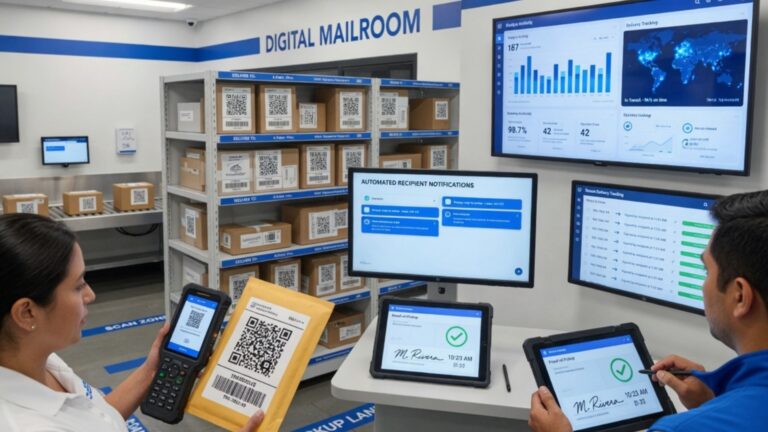
Mailrooms have changed dramatically as workplaces, universities, residential buildings, hotels, and corporate campuses receive more parcels than ever before. Manual sign-in sheets, paper logs, and informal handover processes often struggle to keep up with today’s delivery volume. That is why digital mailroom technologies are becoming essential for organisations that want faster parcel logging, better recipient communication, improved security, and a clearer audit trail from delivery arrival to final pickup.
A modern mailroom is no longer just a storage area for letters and packages. It is a logistics hub where incoming deliveries must be scanned, matched to recipients, stored safely, communicated quickly, collected securely, and recorded accurately. Without the right systems, teams may face lost parcels, long queues, frustrated recipients, unclear accountability, and time-consuming manual administration.
This guide explains what digital mailroom tools are, how they work, which features matter most, and how organisations can choose the right solution for smoother parcel and mail management.
What Are Digital Mailroom Technologies?
Digital mailroom technologies are software and automation tools that help organisations manage incoming mail, parcels, packages, documents, and internal deliveries electronically. Instead of recording deliveries on paper or spreadsheets, staff can scan package labels, assign items to recipients, send notifications, track collections, and keep digital records.
A typical digital mailroom system may include:
- Parcel label scanning
- Recipient matching
- Automated email, SMS, or app notifications
- Digital proof of pickup
- Signature capture
- Photo confirmation
- Timestamped delivery records
- Searchable parcel history
- Mailroom analytics
- User directories
- Secure access controls
- Reporting tools
- Mobile device support
The goal is to make the entire process more accurate, visible, and efficient for staff and recipients.
Why Digital Mailroom Technologies Matter
Digital mailroom technologies matter because delivery expectations have changed. People now expect fast updates, clear communication, and convenient collection. At the same time, organisations need secure tracking and reliable records.
Manual mailroom processes can create several problems:
- Parcels are logged incorrectly
- Recipients are not notified quickly
- Packages sit uncollected for days
- Staff spend too much time searching shelves
- Delivery records are incomplete
- Lost parcel disputes are hard to resolve
- Mailroom queues become longer
- Sensitive items lack proper tracking
A digital system helps reduce these issues by creating a structured workflow. Every parcel can be logged, assigned, monitored, and closed out with proof of collection.
How Digital Mailroom Technologies Work
Most digital mailroom systems follow a simple process: check in, notify, collect, and archive.
When a parcel arrives, staff scan the label using a mobile device, tablet, barcode scanner, or camera-enabled app. The system captures delivery details and matches the parcel to a recipient using directory information or manual selection. The recipient then receives an automated notification telling them the item is ready for pickup.
When the recipient collects the parcel, the system records proof of pickup. This may include a signature, photo, timestamp, staff confirmation, or digital checkout record. The item is then archived in the system so staff can search delivery history later if needed.
This process creates accountability at each step and reduces reliance on memory, paper notes, or scattered spreadsheets.
Digital Mailroom Technologies for Parcel Tracking
Parcel tracking is one of the most valuable features of a digital mailroom. Organisations often receive deliveries from multiple couriers, and once a package enters the building, it becomes the responsibility of the internal mailroom team.
Digital tracking helps answer important questions:
- When did the parcel arrive?
- Who accepted it?
- Where was it stored?
- Who was notified?
- Has the recipient collected it?
- Who handed it over?
- Is there proof of pickup?
- How long did it remain in the mailroom?
This visibility is useful for offices, student housing, universities, apartment buildings, coworking spaces, hotels, and large facilities where many people receive deliveries daily.
Digital Mailroom Technologies and Automated Notifications
Automated notifications are one of the biggest improvements over manual mailroom processes. Instead of calling recipients, sending individual emails, or writing notes, staff can trigger notifications automatically when a parcel is logged.
Notification channels may include:
- SMS
- Mobile app alerts
- Slack
- Microsoft Teams
- Internal portals
- Custom workplace communication tools
Fast notifications help reduce parcel storage time and encourage quicker collection. They also improve the recipient experience because people know exactly when their delivery is ready.
For busy mailrooms, automated communication can save significant time and reduce repetitive administrative work.
Digital Mailroom Technologies for Security and Accountability
Security is a major reason organisations adopt digital mailroom systems. Packages may contain personal items, business documents, electronics, legal paperwork, medical supplies, or confidential materials. A weak tracking process can create disputes and risk.
Digital mailroom security features may include:
- User access permissions
- Digital pickup records
- Recipient verification
- Signature capture
- Photo proof
- Time-stamped audit trails
- Secure package status updates
- Staff activity logs
- Role-based administration
A reliable audit trail protects both the organisation and the mailroom staff. If a parcel is questioned later, the team can review the digital record instead of relying on handwritten logs or memory.
Digital Mailroom Technologies for Offices and Corporate Buildings
In office buildings, mailroom teams often manage deliveries for employees, departments, visitors, and sometimes multiple tenant companies. Digital tools can help prevent confusion by assigning parcels to the right recipient or business unit.
Corporate mailroom benefits may include:
- Faster package logging
- Reduced reception desk workload
- Better employee notifications
- Clearer chain of custody
- Reporting by department
- Improved visitor and tenant experience
- Secure handling of sensitive deliveries
For hybrid workplaces, digital mailroom systems are especially useful because employees may not be onsite every day. Automated reminders and pickup tracking can help manage parcels when recipients are away.
Digital Mailroom Technologies for Universities and Student Housing
Universities and student accommodation providers often deal with high parcel volumes, especially at the start of term, during holidays, and around sales events. Manual processes can quickly become overwhelmed.
Digital mailroom tools can help student housing teams:
- Process deliveries faster
- Notify students automatically
- Reduce long pickup lines
- Track uncollected parcels
- Manage multiple buildings
- Support staff handovers
- Improve service consistency
Students expect quick, mobile-friendly communication. A digital mailroom system helps meet that expectation while giving staff better control over storage and collection.
Digital Mailroom Technologies for Hospitality and Residential Properties
Hotels, serviced apartments, and residential buildings often receive guest and resident deliveries. These environments require both convenience and professionalism.
Useful features may include:
- Guest or resident parcel notifications
- Front desk tracking
- Proof of handover
- Multi-location support
- Secure package storage records
- Easy search by name or room number
- Staff accountability logs
For hospitality teams, efficient parcel handling can improve guest experience. For residential buildings, it can reduce package disputes and improve resident satisfaction.
Analytics and Reporting in Digital Mailroom Technologies
Analytics can turn mailroom activity into useful operational insight. Instead of guessing how busy the mailroom is, managers can review real data.
Reporting may show:
- Daily or monthly parcel volume
- Peak delivery times
- Average pickup time
- Uncollected parcel counts
- Courier activity
- Staff workload
- SLA performance
- Department or building trends
These insights can help managers adjust staffing, improve storage layouts, identify bottlenecks, and plan for seasonal delivery spikes.
Choosing Digital Mailroom Technologies
Choosing the right system depends on the organisation’s size, delivery volume, security needs, and existing workflow.
Before selecting a solution, ask:
- How many parcels are received daily or monthly?
- How many locations need support?
- Does the system work on mobile devices?
- Can it scan labels accurately?
- Does it support automated notifications?
- Can it capture proof of pickup?
- Is the interface easy for staff to use?
- Does it integrate with directories or communication tools?
- What reporting features are available?
- How is data secured?
A good solution should improve workflow without adding unnecessary complexity. Staff adoption matters, so ease of use is just as important as advanced features.
Implementation Tips for Digital Mailroom Technologies
Successful implementation starts with process mapping. Before switching systems, organisations should understand how parcels currently move through the mailroom.
Helpful steps include:
- Audit the current mailroom process
- Identify common delays and errors
- Define check-in and checkout rules
- Clean recipient directory data
- Train staff on scanning and notifications
- Create clear storage zones
- Communicate the new process to users
- Test the system with a pilot group
- Review reports after launch
- Adjust workflows based on feedback
A digital mailroom should support people, not replace good procedures. Clear roles, clean data, and staff training are essential.
Common Mistakes to Avoid
Organisations can struggle with mailroom technology if they rush implementation or choose tools that do not fit their workflow.
Common mistakes include:
- Keeping outdated manual steps alongside the system
- Not training temporary or part-time staff
- Using incomplete recipient directories
- Ignoring data privacy requirements
- Failing to define pickup procedures
- Not tracking proof of collection
- Choosing software without reporting tools
- Overlooking multi-site needs
- Not communicating changes to recipients
- Treating technology as a complete solution without process improvement
The best results come from combining the right software with consistent mailroom procedures.
Conclusion: Digital Mailroom Technologies for Better Delivery Management
Digital mailroom technologies help organisations manage parcels, mail, documents, and internal deliveries with greater speed, accuracy, security, and visibility. By replacing manual logs with scanning, automated notifications, proof of pickup, searchable records, and analytics, modern mailrooms can reduce errors and improve the recipient experience. Whether used in offices, universities, residential buildings, hotels, or large facilities, digital mailroom technologies support smoother operations and stronger accountability. The key is choosing a system that fits real workflows, protects data, and remains easy for staff and recipients to use.
FAQs
What are digital mailroom technologies?
Digital mailroom technologies are software tools that help organisations scan, track, notify, deliver, and archive parcels or mail electronically.
How do digital mailroom technologies improve parcel tracking?
They create digital records with timestamps, recipient details, pickup status, proof of collection, and searchable delivery history.
Who can use digital mailroom technologies?
Offices, universities, student housing, hotels, residential buildings, coworking spaces, and large facilities can use them.
Do digital mailroom systems send notifications?
Yes, many systems can send automated notifications by email, SMS, app alerts, Slack, Microsoft Teams, or other channels.
Are digital mailroom technologies secure?
They can improve security through access controls, audit trails, recipient verification, signatures, timestamps, and pickup records.
What should I look for in mailroom software?
Look for easy scanning, automated notifications, proof of pickup, reporting, integrations, security controls, and simple staff usability.


