

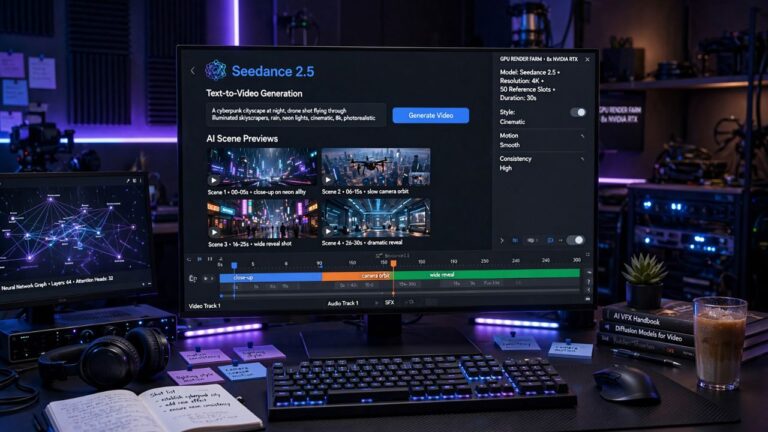
Artificial intelligence is transforming how videos are planned, produced, and edited. Content creators, marketers, educators, and businesses are increasingly using AI-powered platforms to accelerate production while maintaining creative flexibility. Seedance 2.5 is part of this growing wave of AI video generation tools, offering users new ways to create visual content from text prompts, images, and creative concepts. As AI video technology continues to evolve, understanding the capabilities, workflow, and practical applications of Seedance 2.5 can help creators decide whether it fits their production needs.
What Is Seedance 2.5?
Seedance 2.5 is an AI-powered video generation platform designed to help users create videos using artificial intelligence. Depending on the available features and platform updates, users may generate videos from text prompts, reference images, or other supported inputs.
AI video generation platforms are increasingly used for:
- Marketing videos
- Social media content
- Product demonstrations
- Educational materials
- Creative storytelling
- Business presentations
Available functionality may change over time as the platform develops.
Why AI Video Creation Is Growing
Video remains one of the most effective digital content formats.
AI-powered production tools help creators:
- Reduce editing time
- Generate visual concepts quickly
- Produce content more efficiently
- Explore creative ideas
- Support faster content publishing
AI assists the creative process but does not replace human planning, editing, or creative judgment.
Key Features of Seedance 2.5
Text-to-Video Generation
One of the core capabilities of Seedance 2.5 is converting written prompts into AI-generated video scenes.
Users typically describe:
- Subjects
- Environments
- Camera angles
- Lighting
- Style
- Motion
The AI interprets these prompts to generate visual content.
Image-to-Video Animation
Some AI video platforms allow users to upload images that are transformed into animated sequences.
Potential applications include:
- Product showcases
- Character animation
- Marketing visuals
- Concept demonstrations
Feature availability depends on the platform version.
Cinematic Visual Styles
AI video generators often support multiple artistic styles.
Examples include:
- Realistic
- Cinematic
- Animated
- Minimalist
- Fantasy
- Science fiction
Different styles suit different creative projects.
How Seedance 2.5 Works
Although workflows differ, AI video creation generally follows these steps:
- Enter a text prompt.
- Upload reference materials if supported.
- Choose output settings.
- Generate the video.
- Review the result.
- Refine prompts if needed.
Many creators generate multiple versions before selecting a final output.
Benefits of Using Seedance 2.5
Faster Content Production
AI can automate parts of the creative workflow that traditionally required manual editing.
This may reduce production time for many projects.
Creative Inspiration
Generated scenes can help users visualize ideas during early planning stages.
Many creators use AI as a brainstorming tool before final editing.
Accessibility
AI video platforms make content creation more accessible to users without advanced video editing experience.
Ease of use varies by software.
Common Use Cases
Seedance 2.5 may be suitable for creating:
- YouTube videos
- Short-form social media content
- Product advertisements
- Explainer videos
- Educational presentations
- Internal business communications
- Creative storyboards
The quality of results depends on prompt design and platform capabilities.
Writing Better AI Prompts
Prompt quality significantly influences AI-generated videos.
Helpful prompt details include:
- Subject description
- Background
- Camera movement
- Lighting conditions
- Mood
- Art style
- Scene duration
Specific prompts often produce more predictable outputs.
Editing AI-Generated Videos
Many creators continue refining AI-generated content after export.
Post-production may include:
- Voiceovers
- Music
- Captions
- Branding
- Color correction
- Scene trimming
- Transitions
Human editing often improves the final production.
Choosing the Right AI Video Tool
Before selecting an AI platform, compare:
- Video quality
- Ease of use
- Rendering speed
- Supported export formats
- Editing options
- Pricing
- Commercial licensing terms
- Customer support
Choosing software should align with your production goals.
Best Practices for AI Video Creation
To improve results:
- Write detailed prompts.
- Experiment with multiple versions.
- Use high-quality reference images where supported.
- Review outputs carefully.
- Edit before publishing.
- Verify factual information included in videos.
AI-generated content should always be reviewed before public release.
Responsible AI Content Creation
Creators should:
- Respect copyright laws.
- Avoid misleading audiences.
- Follow platform usage policies.
- Obtain permission when using identifiable people or protected content.
- Be transparent where appropriate about AI-generated media.
Responsible use supports trust and ethical content creation.
Future of AI Video Generation
AI video technology continues to advance in areas such as:
- Longer video generation
- Improved realism
- Better character consistency
- Faster rendering
- Higher resolutions
- Enhanced creative controls
Future updates will likely continue expanding creative possibilities.
FAQs
What is Seedance 2.5?
Seedance 2.5 is an AI-powered video generation platform designed to help users create videos from text prompts, images, and other supported inputs.
Can Seedance 2.5 create videos from text?
Yes. Depending on the platform’s current capabilities, users can generate AI videos by describing scenes through text prompts.
Who can use Seedance 2.5?
Content creators, marketers, educators, designers, businesses, and creative professionals may use AI video generation tools for a variety of projects.
Does Seedance 2.5 replace traditional video editing?
No. AI can accelerate content creation, but many creators continue using traditional editing software to refine and finalize their videos.
Is AI-generated video suitable for commercial use?
Commercial use depends on the platform’s licensing terms and conditions. Always review the official licensing policy before publishing or monetizing AI-generated content.
Conclusion
Seedance 2.5 reflects the rapid advancement of AI-powered video creation by helping users transform written ideas into visual content with greater speed and flexibility. Whether producing educational videos, marketing campaigns, social media content, or creative concepts, AI-assisted generation can simplify parts of the production process while encouraging experimentation. As AI video technology continues to evolve, combining intelligent automation with human creativity, careful editing, and responsible content practices remains the most effective approach for producing high-quality results.


