

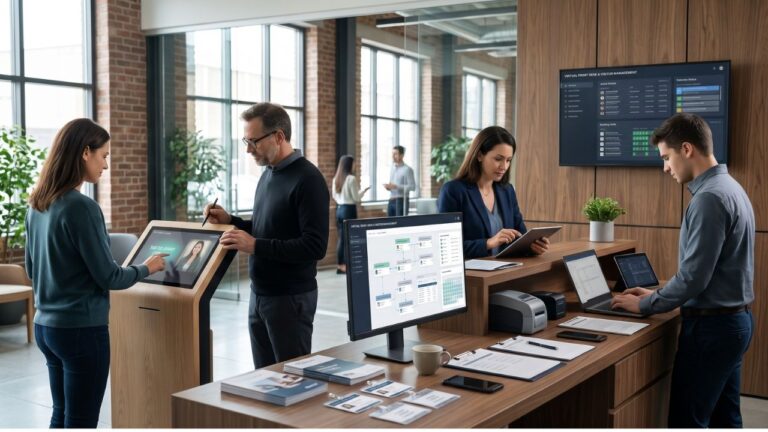
An AI front desk combines conversational software, visitor management and connected business systems to help guests get answers, check in and reach the right people. Depending on the setup, it may work through a lobby kiosk, website chat, phone service or a tablet used by reception staff. Its purpose is not to eliminate hospitality. A useful system handles predictable tasks while making it easier for employees to provide personal assistance when a visitor needs judgment, reassurance or an exception. The best results come from clear workflows, accurate information and a welcoming experience that remains accessible to everyone.
Unlike a basic appointment calendar or telephone answering service, front desk operations also involve physical arrivals, identification, waiting areas, deliveries, building access and unexpected interruptions. This guide explains twenty five practical improvements, how to choose suitable software, and how to evaluate security, costs and real service quality before rolling it out.
What Is an AI Front Desk?
An AI front desk is a collection of automated reception functions powered partly by artificial intelligence. A visitor might ask where a meeting is taking place, notify an employee that they have arrived, or request help with a reservation. The system can interpret the request, retrieve approved details, and take an authorised action through a connected tool. Some products primarily offer chat or voice conversations; others emphasise physical kiosks, visitor badges or staff notifications.
The important distinction is between understanding a question and completing a reliable workflow. A convincing voice cannot independently grant permission to enter a secure building. Similarly, an attractive check-in screen is not useful if an employee never receives the arrival notification. Every feature should be evaluated by what it can verify and do, not by the quality of a promotional demonstration.
How AI Differs From a Traditional Reception Desk
A human receptionist can use context, judgment and empathy across unfamiliar situations. Automated tools generally work best within defined instructions, approved information and secure integrations. A practical design combines both, allowing routine arrivals to move quickly while preserving a visible route to human help.
25 Smart Ways to Improve Daily Front Desk Operations
1. Map the Full Visitor Journey
Observe what happens before, during and after someone arrives. Identify how they locate the entrance, check in, find the right person, wait and leave. Include people without appointments as well as expected guests. This map reveals where automation might remove repetitive work and where physical assistance remains essential.
2. Separate Visitors From Callers
A person standing in the lobby has different needs from someone calling to ask about opening hours. Design separate workflows for walk-in customers, prebooked guests, couriers and remote enquiries. An AI front desk can connect these channels, but it should not assume that a message sent to an absent employee solves an immediate situation at the entrance. Give in-person visitors clear next steps and realistic expectations.
3. Keep the Welcome Short and Clear
The first screen or greeting should identify the organisation and explain how to get assistance. Use simple choices such as checking in for a meeting, asking a question or contacting reception staff. Tell people when they are interacting with automation rather than implying a human is answering.
4. Make Check-In Work for Expected Guests
Where appointments are relevant, connect check-in with a current visitor list or reservation record. Confirm only the details necessary to identify the correct booking. Names can be shared by more than one person, so design a safe method for handling duplicates without revealing another guest’s information. Test early arrivals, late arrivals and a visitor whose booking was changed shortly before they reached the building.
5. Provide a Sensible Walk-In Route
Not everyone will have a booking or know which employee they need. Offer a general assistance path that captures the reason for the visit without demanding a long form. Direct the person to a staffed desk or approved waiting process where appropriate. Do not allow software to invent available appointments, promise entry or send an uninvited person into restricted areas.
6. Notify the Right Employee Reliably
Arrival alerts should reach the actual host through a channel that employees monitor. Test notifications when a host is in a meeting, on leave or away from their desk. The system should have a backup contact and a reasonable timeout rule. A check-in confirmation should never suggest that a guest has been received personally when no one has acknowledged the notification.
7. Set Clear Rules for Human Handoffs
Automation needs an obvious way to reach staff when information is missing, the visitor is distressed or an exception arises. Define which questions trigger a handoff and what the employee receives. Keep the transfer summary short, accurate and limited to necessary details. A good AI front desk does not repeatedly ask the same question after a visitor has requested human assistance.
8. Make Directions Easy to Follow
People often need help finding meeting rooms, elevators, accessible entrances or restrooms. Provide approved directions with familiar landmarks and simple language. If the building layout changes, update the information promptly. Never instruct someone to pass through a secured door, enter a staff only area or use an inaccessible route merely because it appears shorter on an internal floor plan.
9. Treat Building Access as a Separate Decision
Check-in and access permission are not the same thing. An assistant may notify security or initiate an approved access request, but granting credentials requires a verified policy and suitable controls. Restrict what the software can issue or change. For higher risk locations, require human approval and maintain an audit trail.
10. Keep Identity Checks Proportionate
Some locations need identification for legal, safety or security reasons; others do not. Collect only what the approved process requires and explain the purpose. Avoid automatically scanning identification documents or capturing facial images simply because a vendor offers that feature. Biometric and identity data can bring additional legal duties. Work with privacy and security advisers before introducing sensitive identification methods.
11. Design for Accessibility From the Start
A touchscreen should not be the only practical way to obtain service. Consider screen height, readable contrast, large text, clear labels, audio options and access for people who cannot comfortably use touch controls. Provide a nearby human alternative and test with users who have different access needs. Applicable accessibility requirements depend on the type of business, location and installation; product marketing claims alone are not proof of compliance.
12. Support Multiple Languages Carefully
An AI front desk may help visitors who prefer a language other than English, but language availability does not guarantee accurate names, instructions or technical vocabulary. Test the languages most commonly used at the location. Display important directions clearly and permit an easy switch to a staff member. If a translation could affect safety, identity or access, require appropriate verification instead of treating the automated wording as definitive.
13. Keep Appointment Changes Accurate
A visitor may arrive for an appointment that was rescheduled or cancelled. Connect the reception process to a dependable source of booking truth. Distinguish an appointment request from a confirmed reservation and avoid displaying private calendar details. If two systems disagree, tell the visitor that staff will verify the status. Incorrect confidence causes more frustration than a brief, transparent delay.
14. Explain Waiting Without Making Promises
Queue management can organise arrivals and tell visitors what happens next. It should not invent precise waiting times when staffing or service duration is uncertain. A basic status such as checked in, waiting for host or staff assistance requested is often enough. If estimated waits are shown, label them appropriately and update them when circumstances change. Allow staff to override an inaccurate queue state.
15. Separate Packages and Deliveries From Guest Check-In
Couriers need a fast route that does not disclose employee schedules or invite them into private offices. Define where deliveries may be left, who can accept them and how recipients are notified. A visitor platform might log a package, but physical custody still belongs to an authorised person. Avoid displaying sensitive shipment information on a public screen or making the courier repeat unnecessary personal details.
16. Provide Accurate Hours and Service Information
Keep a maintained knowledge base containing opening times, public contact details, visitor policies and available services. Assign someone to update it before holidays, renovations and staffing changes. Where information is unknown, the assistant should say so and offer a reliable next step. A confident answer copied from an outdated document can create a worse experience than admitting uncertainty.
17. Protect Privacy in Shared Reception Areas
Public kiosks and lobby screens are visible to strangers. Avoid showing full appointment lists, private contact details, medical reasons for visits or previous users’ information. Clear sessions automatically after inactivity, hide input when appropriate and restrict who can access stored records. Staff displays should use role based permissions. Privacy needs to shape the interface, not be added after installation.
18. Decide How Conversation Records Are Stored
Review whether the service retains voice recordings, transcripts, chat messages, identity details and check-in history. Ask where those records are stored, how long they are kept, who can access them and what deletion procedures exist. Data may pass through several vendors when speech recognition, scheduling and notifications are connected. Document those flows before inviting real visitors to use the service.
19. Plan for Outages and Weak Connections
A lobby cannot stop functioning whenever the internet or a third party service becomes unavailable. Provide a manual check-in method, a staffed contact and a clear way to record arrivals temporarily. Test how the system behaves when a notification fails or the appointment database is offline. After service returns, reconcile records without producing duplicate visits or revealing information to the wrong host.
20. Review Payments and Sensitive Transactions
Some reception systems support invoices, deposits or service payments. Confirm whether the payment function is actually provided by an appropriate processor and how refunds or disputes are handled. Do not display payment card data on public screens or request unnecessary financial information through open conversation. A visitor should receive clear confirmation only after the transaction succeeds, not when the assistant merely starts a payment request.
21. Give Reception Staff Useful Controls
Employees need to correct mistakes, acknowledge arrivals, reassign hosts and intervene during difficult situations. Make these controls understandable and permission based. A platform that requires staff to contact vendor support for every ordinary change will create more work. Ask employees which exceptions occur most often and build the training process around them. Automation should improve their ability to help, not remove practical discretion.
22. Measure Completed Help Rather Than Interactions
Counting touchscreen taps or answered questions is not enough. Track successfully completed check-ins, time to host acknowledgement, unresolved requests, staff interventions and visitor complaints. Compare measures before and after implementation using a consistent method. A high automation rate can hide a poor experience if guests wait longer or leave without assistance. Use feedback and operational data together rather than treating one dashboard as proof of success.
23. Calculate Total Ownership Cost
The price of an AI front desk can include subscriptions, kiosks or tablets, installation, telephone or messaging usage, integrations, security review, maintenance and staff training. Compare these costs with real administrative savings and service improvements. If the vendor charges per visitor or interaction, model both quiet periods and busy days. A cheap trial may not represent the cost of operating several entrances or locations.
24. Pilot One Entrance or Workflow First
Test the system in a controlled setting before a full rollout. Use realistic scenarios such as a visitor with a misspelled name, a host who is absent, a person requiring accessible assistance and an unexpected delivery. Watch the whole process, including what reception staff must do afterward. Refine confusing language and failed notifications before expanding to other floors or branches.
25. Keep Reviewing the Experience
Business hours, floor layouts, staff responsibilities and visitor expectations change. Assign clear ownership for updating the system and evaluating incidents. Review security permissions and retention rules periodically. Invite reception employees to report recurring misunderstandings without blaming them for software failures.
Where an AI Front Desk Fits Best
Suitability depends on the volume, complexity and sensitivity of visits. Corporate offices may benefit from host alerts and meeting directions, while shared workspaces need visitor identity and tenant routing rules. Hotels may use automation for general questions or service requests, but guest registration, payment and accessible room reservations can require specialised systems. Fitness studios may combine attendance confirmation with staffed support during peak periods.
Healthcare, Education and Other Sensitive Settings
Clinics, schools and similar organisations must be particularly careful about what the reception platform collects and who can see it. In the United States, a service that handles protected health information on behalf of a HIPAA covered organisation may need a business associate agreement and appropriate safeguards. Scheduling support does not automatically make a product suitable for clinical triage or confidential records. Educational and child related settings may require separate identity, safeguarding and access procedures.
When an AI Front Desk Should Hand Off
Human assistance is important when a visitor is confused, has a disability related request, disputes an appointment, reports a safety issue or needs an exception to a policy. Define escalation rules before launch, and keep emergency procedures outside a general conversational assistant’s discretion. An automated system should not improvise medical, legal or security decisions simply to complete an interaction.
How to Choose the Right Front Desk Software
Start with the main job the product must perform. Evaluate how visitor records, conversational tools and employee notifications connect, and insist on a demonstration using your actual workflow.
Integrations and Reliability
Ask whether the product works with the business’s scheduling platform, directory, communication tools and approved access controls. Confirm which connections require separate subscriptions and what happens when one fails. Review service availability commitments, support hours and the procedure for reporting an urgent issue. For multi location operations, test whether each branch can have its own staff, hours and visitor rules.
Questions to Ask During a Demonstration
Can the system verify a real arrival without exposing another guest’s record? Can employees correct mistakes and reach visitors who need help? What happens after a failed host alert, network interruption or abandoned session? How do data export and deletion work? These questions reveal more than the number of languages, voices or visual themes advertised on a product page.
An Implementation Plan That Protects Service Quality
Document visitor types and map the current reception process. Decide what the software may do independently and what still needs human approval. Prepare accurate public information, configure data permissions and check that the kiosk or interface is physically accessible. Train staff to handle exceptions and keep a manual backup available.
Run a pilot using both scheduled and unexpected visitors. Test announcements, check-in, human handoff, accessibility needs, privacy settings and offline conditions. Collect comments from visitors and employees, then address the most disruptive failures before full deployment. Set a review date after launch rather than assuming the initial configuration will remain correct.
A Realistic Office Arrival Example
A consultant arrives for a scheduled meeting and selects the meeting check-in option. The system verifies the appointment using minimal identifying information and notifies the host. If the host acknowledges, the guest receives approved directions or an invitation to wait. If no acknowledgement arrives, the visitor is offered staff assistance. Throughout the process, the public screen shows no unrelated meetings or private contact records. This workflow provides convenience without claiming that automation alone can guarantee admission or immediate service.
Frequently Asked Questions
1. What does an AI front desk do?
It can answer routine questions, assist with visitor check-in, send host notifications and guide people to approved services, depending on its integrations.
2. Is an AI front desk the same as an AI receptionist?
Not always. Front desk systems may manage physical arrivals, visitor queues, badges and building procedures, while some receptionist tools focus mainly on phone calls.
3. Can an AI front desk replace human reception staff?
It can automate repetitive tasks, but sensitive requests, unusual situations, accessibility assistance and security decisions often still require trained people.
4. How much does an AI front desk cost?
Costs vary with software subscriptions, hardware, locations, integrations, messaging, maintenance and support. Compare a complete operating budget rather than a trial price.
5. Is AI visitor check-in secure?
Security depends on identity rules, access permissions, data handling, vendor safeguards and human oversight. An automated check-in is not itself proof of authorised entry


