

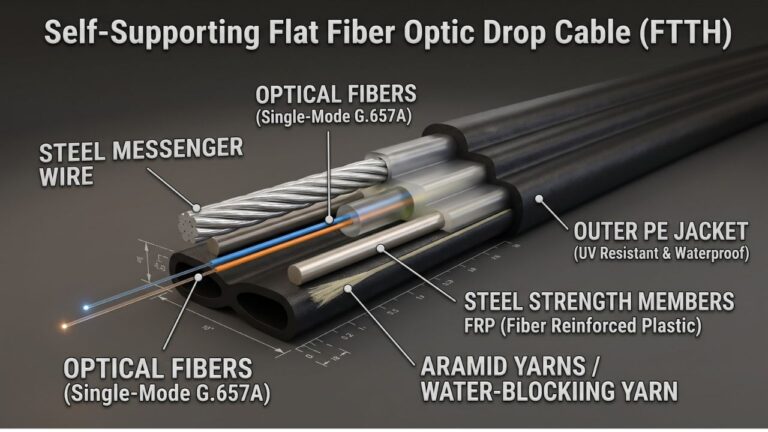
High-speed internet connections depend on reliable infrastructure that carries optical signals between telecommunications networks and individual properties. In fiber-to-the-home and fiber-to-the-premises deployments, the final connection is especially important because it may pass through outdoor environments, building entrances, narrow conduits, and indoor spaces. A Drop Fiber Optic Cable is designed for this last-mile connection, helping network operators deliver fiber connectivity from a distribution point to a home, office, or other subscriber location.
Drop cables are widely used in residential broadband installations, apartment buildings, business premises, and modern access networks. Unlike larger backbone cables, which may contain many optical fibers and travel substantial distances, drop cables usually serve individual subscribers or relatively small groups of endpoints.
Their construction must balance flexibility, mechanical strength, environmental protection, and optical performance.
Different installations require different cable designs. An aerial connection between a utility pole and a house may need self-supporting capabilities, while an underground route may require a cable specifically rated for conduit or direct burial.
Likewise, an indoor installation may prioritize flexibility and suitable fire-performance characteristics.
Selecting the correct cable is essential because improper construction, excessive bending, poor routing, or unsuitable installation practices can lead to optical signal loss and expensive maintenance.
This guide explains drop fiber optic cable types, construction materials, technical specifications, installation methods, testing procedures, and practical considerations for reliable FTTH networks.
What Is a Drop Fiber Optic Cable?
A drop fiber optic cable is a fiber cable designed to connect a telecommunications distribution network to a subscriber’s premises or another nearby network termination point.
In a typical FTTH installation, the main distribution network extends through a neighborhood.
A local fiber distribution terminal or access point provides connections for nearby subscribers.
The drop cable carries the optical connection from this distribution infrastructure toward the subscriber’s property.
At the premises, the fiber may terminate at a suitable enclosure, optical outlet, or network termination device.
Why Is It Called a Drop Cable?
In telecommunications, a drop refers to the connection from a distribution network to an individual customer or location.
The term does not necessarily mean the cable is installed vertically.
Drop cables can be routed through overhead spans, underground ducts, exterior walls, or other approved pathways.
What Makes Drop Cables Different?
Compared with larger distribution or backbone cables, drop cables often have smaller dimensions and relatively low fiber counts.
They are designed to simplify installation close to subscriber premises.
Their actual construction depends on environmental and mechanical requirements.
How Drop Fiber Optic Cable Works in FTTH Networks
Fiber-to-the-home networks use optical fibers to transport information through pulses of light.
Network Distribution
A fiber access network connects central infrastructure with neighborhood distribution points.
Distribution Terminal
A fiber terminal provides an accessible connection point for individual subscriber drops.
Drop Cable Connection
The drop cable extends from the distribution point toward the subscriber.
Building Entry
The cable enters the property through a suitable protected route.
Optical Termination
The fiber connects to compatible equipment or a termination enclosure.
Optical Network Terminal
In many FTTH deployments, an optical network terminal communicates with the provider’s access network.
Internet Service
The subscriber’s router or other networking equipment provides the local network connection.
The drop cable itself does not determine the subscriber’s internet speed. Performance also depends on optical transceivers, network technology, service provisioning, and the broader network.
Common Types of Drop Fiber Optic Cable
Several cable designs are available for different installation conditions.
Flat Drop Fiber Optic Cable
Flat drop cable has a flattened cross-section, commonly with reinforcing elements positioned around the optical fiber.
This construction can simplify routing along certain surfaces.
Flat designs are widely used in subscriber connections.
Round Drop Fiber Optic Cable
Round drop cables use a circular construction.
Depending on the product, they may include reinforcing fibers, protective layers, and specialized jackets.
Round designs can provide flexibility for certain indoor/outdoor pathways.
Self-Supporting Drop Cable
Self-supporting cables are designed for specified aerial installations.
Some designs include an integrated messenger or other tensile support structure.
The cable must be rated for the intended span, environmental loading, and installation method.
Indoor Drop Cable
Indoor designs prioritize installation within buildings.
They must satisfy applicable building and fire-safety requirements.
Outdoor Drop Cable
Outdoor cables are designed to withstand relevant environmental exposure.
Requirements may include moisture resistance, ultraviolet resistance, and mechanical durability.
Indoor/Outdoor Drop Cable
Certain products are designed for approved transitions between outdoor and indoor environments.
However, the permitted indoor distance and installation conditions depend on the cable listing and local requirements.
Armored Drop Cable
Armored designs provide additional mechanical protection for particular installations.
The armor construction and suitability vary by product.
Flat vs. Round Fiber Optic Drop Cable
The choice between flat and round construction depends on the installation.
Flat Cable Advantages
Flat designs may offer convenient routing along walls and other surfaces.
Some are easy to prepare for termination.
Round Cable Advantages
Round designs may offer handling benefits in certain ducts or building pathways.
Some products are constructed for both indoor and outdoor environments.
Mechanical Strength
Both designs can incorporate reinforcing materials.
Strength should be evaluated using manufacturer specifications rather than appearance alone.
Bend Performance
Optical bend performance depends on the fiber type and overall cable design.
Installation Environment
A flat cable suitable for wall routing may not be appropriate for a demanding aerial span or underground installation.
Choosing Between Them
Evaluate cable ratings, available pathways, installation tension, bend limits, and termination requirements.
The correct choice is the one that meets the project’s technical specifications.
Understanding Fiber Counts in Drop Cables
Fiber count describes the number of individual optical fibers inside a cable.
Single-Fiber Drop Cable
A one-fiber cable may be suitable for common subscriber connections.
Two-Fiber Drop Cable
Two-fiber designs may serve applications requiring additional connectivity or redundancy.
Four-Fiber Drop Cable
Some installations use four-fiber cables when multiple connections or future requirements are anticipated.
Higher Fiber Counts
Specialized access deployments may require additional fibers.
Fiber Count vs. Internet Speed
More fibers do not automatically mean faster internet service.
Transmission capacity depends on the network equipment, optical technology, and provisioned service.
Planning for Growth
Network designers should consider anticipated requirements before selecting fiber counts.
What Is G.657 Bend-Insensitive Fiber?
ITU-T G.657 describes characteristics of bend-loss-insensitive single-mode optical fiber and cable.
The recommendation addresses improved bending performance compared with conventional single-mode fiber characteristics.
This is particularly relevant to access networks because subscriber connections frequently encounter restricted spaces.
Why Bend Resistance Matters
Excessive bending can increase optical attenuation.
Bends may also introduce long-term mechanical stress.
G.657 Fiber Categories
The standard describes categories with different compatibility and bending characteristics.
Selecting the correct category depends on the application and network design.
Indoor Applications
Bend-insensitive fiber can be useful where the cable must pass around appropriate corners or through compact pathways.
Outdoor Applications
Fiber bend performance also matters where cables are routed through enclosures and entry points.
Important Limitation
Bend-insensitive does not mean bend-proof.
Every cable still has manufacturer-specified handling and installation limits.
Key Components of a Fiber Optic Drop Cable
Understanding cable construction helps installers choose an appropriate product.
Optical Fiber
The optical fiber carries light-based communication signals.
Fiber Coating
A protective coating helps protect the glass fiber during manufacturing and handling.
Strength Members
Reinforcing materials help the cable withstand specified mechanical loads.
Depending on the design, these may include fiberglass-reinforced plastic, aramid yarn, or metallic elements.
Outer Jacket
The jacket provides environmental and mechanical protection.
Water-Blocking Materials
Outdoor-rated designs may incorporate materials intended to limit moisture migration.
Messenger Element
Certain aerial cables contain a dedicated support element.
Armor
Armored cables may include an additional protective layer where required.
Not every drop cable contains every component.
Important Drop Cable Specifications
Technical specifications should guide purchasing decisions.
Fiber Standard
Check whether the product uses the required single-mode fiber type.
Fiber Count
Confirm the number of optical fibers.
Cable Dimensions
The outside dimensions determine compatibility with ducts, clips, and entry points.
Tensile Strength
Cable ratings specify the pulling or operating tension the product is designed to withstand.
Minimum Bend Radius
The cable must not be bent more tightly than permitted by its specifications.
Operating Temperature
Verify suitability for the expected climate.
Jacket Material
Choose materials appropriate for indoor, outdoor, or combined installation.
Crush Resistance
Some cable designs provide defined resistance to compressive loading.
UV and Moisture Resistance
Outdoor installations require appropriate protection.
Fire Performance
Indoor cable selections should satisfy the relevant installation and building requirements.
Aerial Drop Fiber Optic Cable Installation
Aerial drop cables connect premises through appropriately supported overhead routes.
Route Assessment
Installers first evaluate the route and required connection points.
Cable Selection
The chosen cable must support the intended aerial installation conditions.
Mechanical Loading
Wind, temperature, span length, and other environmental factors can affect tension.
Approved Hardware
Suitable clamps, anchors, and other fittings support the cable.
Separation Requirements
Overhead installations must satisfy applicable clearances and utility requirements.
Bend Management
Sharp bending at supports or entry points should be avoided.
Professional Installation
Aerial work can involve falls, energized electrical facilities, and other serious hazards.
Only trained and appropriately authorized personnel should perform this work.
Underground Drop Cable Installation
Underground installation can protect fiber routes from certain types of overhead exposure.
Conduit Installation
The cable may be installed through a suitable underground duct.
Direct Burial
Some cables are specifically designed for direct burial.
An ordinary outdoor cable should not automatically be considered suitable for burial without conduit.
Route Preparation
Installers should account for existing utilities, soil conditions, and required permits.
Cable Protection
Conduits, entry points, and changes in direction need suitable protection.
Pulling Tension
Excessive pulling forces can damage the cable.
Water Management
Underground infrastructure may contain moisture.
Cable construction and accessories should be selected accordingly.
Professional Practice
Buried utility locations must be identified through applicable local utility-location procedures before excavation.
Indoor Fiber Drop Cable Installation
Indoor FTTH installations require careful cable routing and termination.
Pathway Selection
Choose a route that minimizes damage risks and unnecessary bends.
Wall Routing
Use suitable cable clips or management systems.
Avoid crushing the cable with excessive fastener pressure.
Corners
Maintain a suitable bend radius around turns.
Doorways
Protect cable routes from repeated mechanical pressure.
Fire Safety
Use cable types approved for the applicable indoor environment.
Optical Outlet
Terminate the cable in suitable equipment or a protected enclosure.
Final Inspection
Check that the cable remains secure and free from visible mechanical damage.
7 Essential Drop Cable Installation Tips
The following practices help improve installation reliability.
1. Choose the Correct Cable Rating
Confirm that the cable is approved for the intended indoor, outdoor, aerial, duct, or direct-burial application.
2. Follow Bend Radius Requirements
Excessive bending can increase attenuation or damage the fiber.
Use the manufacturer’s actual limits.
3. Respect Pulling Tension
Avoid exceeding the cable’s rated installation tension.
4. Protect Entry Points
Use suitable enclosures, seals, and cable protection where the drop enters a building.
5. Use Compatible Accessories
Select clamps, clips, connectors, and termination equipment appropriate to the cable.
6. Keep Fiber Ends Clean
Contaminated connectors can reduce optical performance.
Use appropriate inspection and cleaning procedures.
7. Test Before Handover
Confirm that the completed link meets the network operator’s requirements.
Document the results where required.
Drop Fiber Optic Cable Connectors and Termination
Drop cables may terminate through connectors, splices, or factory-prepared assemblies.
SC Connectors
SC connectors are common in fiber access deployments.
SC/APC Connectors
Angled physical contact connectors are often used where the network design specifies them.
SC/UPC Connectors
Ultra physical contact connectors are used in other applicable systems.
Connector Compatibility
APC and UPC connector interfaces should not be treated as interchangeable.
Use the exact type specified by the equipment and network.
Fusion Splicing
Fusion splicing joins prepared optical fiber ends using specialized equipment.
Mechanical Splicing
Mechanical splicing provides an alternative method for certain applications.
Pre-Terminated Cable
Factory-terminated assemblies can simplify selected installations.
The termination method should reflect the network’s engineering specifications.
Testing Drop Fiber Optic Cable
A completed installation should be tested before service activation.
Visual Inspection
Inspect accessible cable sections for crushing, kinks, cuts, and poor routing.
Connector Inspection
Use suitable fiber inspection equipment to evaluate connector cleanliness and condition.
Optical Power Testing
Power measurements can help determine whether the received optical signal meets relevant requirements.
Insertion Loss Testing
Insertion loss measurements evaluate optical attenuation across a link.
OTDR Testing
An optical time-domain reflectometer can help locate certain faults and characterize a fiber route.
However, very short links may require appropriate settings and test arrangements for meaningful results.
Documentation
Record the required measurements, test conditions, and results.
Safety
Never look directly into an optical fiber or connector because active optical signals may be invisible.
Common Fiber Drop Cable Problems
Several problems can reduce connection quality.
Excessive Bending
Tight bends may increase optical loss.
Physical Damage
Crushing, cuts, and other mechanical problems can affect the fiber.
Dirty Connectors
Contamination can create excessive insertion loss or reflection.
Incorrect Termination
Poorly executed splices or connectors can reduce performance.
Water Intrusion
Unsuitable protection can expose equipment or cable elements to moisture.
Excessive Aerial Tension
Improperly supported spans can create mechanical stress.
Incorrect Cable Type
Using an indoor-only cable outdoors may lead to premature deterioration.
How to Troubleshoot Fiber Drop Connection Issues
Troubleshooting should follow a controlled process.
Review Service Status
Determine whether the issue affects an individual subscriber or a larger network segment.
Inspect Accessible Equipment
Check for visible damage or disconnected components.
Verify Optical Levels
Use suitable instruments to evaluate link performance.
Inspect Connectors
Follow established fiber cleaning and inspection procedures.
Review Recent Work
Consider whether the problem began after construction, maintenance, or equipment replacement.
Investigate the Route
Qualified technicians may use appropriate instruments to locate suspected cable faults.
Repair and Retest
After completing an authorized repair, repeat the required verification procedures.
Avoid unnecessary handling of active fiber connections.
Drop Fiber Optic Cable vs. Distribution Cable
These cables serve different network roles.
Drop Cable
A drop cable commonly connects a distribution point to a subscriber.
It usually has a relatively small fiber count.
Distribution Cable
A distribution cable carries fibers between access network points and may serve numerous subscribers.
Cable Construction
Distribution cables can contain larger fiber counts and different internal designs.
Installation Requirements
Both categories require appropriate environmental and mechanical ratings.
Network Planning
The correct design depends on the network architecture and expected subscriber demand.
Drop Fiber Optic Cable vs. Ethernet Cable
Fiber and copper Ethernet cables use different transmission methods.
Signal Type
Fiber transmits information using optical signals.
Copper Ethernet cabling uses electrical signaling.
Electromagnetic Interference
Optical fibers are not affected by electromagnetic interference in the same way as conductive copper communication pairs.
Equipment Requirements
Fiber connections require suitable optical equipment.
Distance
Supported link distances depend on the transmission technology and equipment.
Power Delivery
Ordinary optical fiber does not transmit electrical power for Power over Ethernet.
Appropriate Applications
Fiber is widely used for access network connections, while copper Ethernet remains useful for many local networking applications.
How to Choose the Right Drop Fiber Optic Cable
Selecting a cable should begin with the installation environment.
Identify the Route
Determine whether the connection is aerial, underground, indoor, or a combination.
Choose the Fiber Type
Follow the network operator’s fiber specification.
Determine Fiber Count
Select enough fibers for the intended service and planned needs.
Review Mechanical Requirements
Evaluate tension, span length, crush resistance, and routing conditions.
Check Environmental Ratings
Confirm ultraviolet, moisture, temperature, and other applicable requirements.
Verify Bend Limits
Consider the available installation space.
Confirm Termination Compatibility
Make sure the selected cable works with the intended connectors or splice equipment.
Review Supplier Documentation
Use manufacturer data sheets and verified technical specifications.
How Much Does Drop Fiber Optic Cable Cost?
Prices vary by product and project.
Fiber Count
The number of fibers can influence material costs.
Cable Construction
Self-supporting, armored, and specialized constructions may cost more.
Jacket Material
Different environmental and fire-performance requirements affect pricing.
Purchased Length
Cable pricing may depend on roll size and purchase quantity.
Connectorization
Pre-terminated assemblies may have different costs from unterminated cable.
Installation Labor
Route preparation and termination can represent significant project expenses.
Testing
Professional testing and documentation may also add costs.
Total Project Budget
Compare installed project costs rather than cable price alone.
Buying Drop Fiber Optic Cable: Important Considerations
Businesses and installers should evaluate products carefully.
Manufacturer Reputation
Select suppliers with clear technical documentation.
Product Specifications
Confirm fiber standard, cable dimensions, ratings, and construction.
Environmental Suitability
Choose products designed for the expected environment.
Technical Compliance
Review relevant international standards and regional requirements.
Traceability
Product labeling and manufacturer documentation can help support quality control.
Accessories
Ensure compatible termination and installation components are available.
Installation Support
Supplier guidance can be useful for specialized projects.
Warranty
Review warranty terms and installation requirements.
Maintaining Fiber Drop Cable Connections
Fiber access networks require ongoing maintenance.
Inspect Exposed Routes
Check accessible outdoor cable runs for visible damage when authorized.
Maintain Cable Supports
Ensure that clamps and supports remain suitable.
Protect Enclosures
Keep outdoor termination points properly sealed.
Monitor Network Performance
Changes in optical power or service reliability may indicate problems.
Review Construction Activity
Nearby work can damage underground or aerial cables.
Document Repairs
Maintain accurate records of cable replacements and service changes.
Use Qualified Technicians
Fiber repairs require appropriate equipment, training, and safety procedures.
Future Trends in Fiber Optic Drop Cable Technology
Fiber access networks continue expanding as communities and businesses demand reliable broadband connectivity.
Cable manufacturers are developing products that simplify installation and provide suitable performance in increasingly compact pathways.
Bend-insensitive single-mode fiber remains relevant to FTTH networks because subscriber connections often require routing through constrained spaces.
Pre-terminated assemblies and improved installation accessories may also reduce some fieldwork requirements.
However, new products must still be evaluated against recognized standards and actual installation conditions.
In November 2025, ITU-T L.105 addressed optical fiber cables for drop applications, including relevant performance and environmental considerations.
As broadband networks evolve, choosing reliable last-mile cable infrastructure will remain important for operational efficiency and long-term service quality.
Conclusion
A Drop Fiber Optic Cable is an essential component of modern fiber-to-the-home and fiber-to-the-premises networks. It provides the final optical connection between distribution infrastructure and individual subscriber locations. Available designs include flat, round, self-supporting, indoor, outdoor, and armored cables, each intended for specific installation conditions. Selecting the correct product requires careful consideration of fiber type, environmental ratings, mechanical strength, bend radius, termination compatibility, and testing requirements. Professional installation and ongoing maintenance are equally important. By following manufacturer guidance and recognized telecommunications standards, network operators can create reliable subscriber connections that support high-speed broadband services and long-term network performance.


