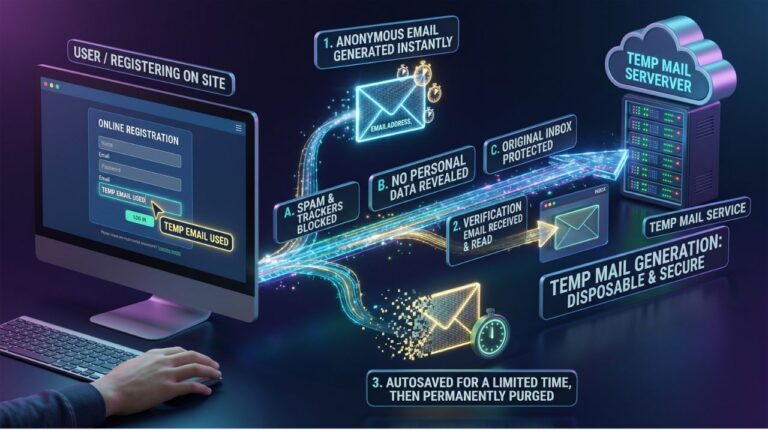
A Temp Mail Generator creates an email address that you can use for a short-lived purpose without sharing your main inbox. People often use disposable addresses to view a public resource, receive a non-sensitive confirmation message, or try an online service that permits temporary email. The appeal is simple: unwanted follow-up messages need not arrive in the account you use for family, work, and essential services. Yet temporary mail is not a security guarantee. Some inboxes have weak access controls, expire unexpectedly, or cannot receive later password-reset messages. Choosing the right option requires understanding both the convenience and the trade-offs.
This guide explains how temporary inboxes work, compares well-known services with longer-lived email aliases, and presents thirteen practical safety tips. It also addresses verification codes, privacy, developer testing, and the situations where a permanent address is the wiser choice.
What Is a Temporary Email Address?
A temporary email address is a mailbox or receiving address designed for limited use. A provider generates an address on a domain it controls, accepts incoming messages, and displays them through a website or app. Depending on the provider, the inbox may expire after minutes, messages may be removed on a schedule, or the visitor may manually replace the address. Many disposable services require no traditional account registration.
An email alias is related but different. An alias generally forwards mail to an existing mailbox and can remain active for months or years. This makes aliases useful for ongoing relationships where you want to hide your primary address but still need receipts, support messages, or account recovery. A disposable inbox is best understood as a temporary receiving channel, not a durable identity.
Why People Use Disposable Inboxes
Common reasons include avoiding unnecessary promotional mail, limiting where a primary address is disclosed, testing how a website sends email, and separating one-off interactions from important correspondence. A throwaway address can reduce the effort of cleaning up spam, but it does not stop a business from tracking you through other information such as cookies, payment details, or your account activity.
How Does a Temp Mail Generator Work?
A service creates an address, such as a random combination of characters at one of its domains, and provides a temporary inbox view. You copy that address into an eligible form. When the website sends a message, the disposable provider receives it and displays it in the associated inbox. Depending on the service, you may need to refresh, and the address or messages can disappear after a set interval.
The provider controls the receiving infrastructure, not you. Unlike a conventional email account, the mailbox might not have a password, reliable recovery process, or long-term storage. An address that seems private because it is random is not automatically protected against someone who learns the mailbox identifier. Never treat temporary email as equivalent to an encrypted personal mailbox.
How to Use a Temporary Inbox Step by Step
Open a reputable temporary-email service and review how long it keeps messages. Copy the generated address and enter it only into a website that permits disposable mail and does not require a long-term recovery channel. Keep the temporary inbox available while waiting for the message. If a confirmation arrives, complete the intended low-risk action, then stop using the address. Do not rely on being able to reopen the same inbox tomorrow.
Before clicking a verification link, confirm the sender and the website that you intentionally used. Unexpected attachments or links can still be malicious, even when received in a throwaway mailbox. If a website requires an email you can access in the future, choose a controlled alias or permanent address instead.
Popular Temporary Email and Email-Masking Options
There is no universally best Temp Mail Generator. Services differ in mailbox lifetime, accessibility, advertising, available domains, sending capability, and privacy practices. Comparing the model of service is more useful than relying on a claim that an inbox is completely anonymous.
Temp-Mail: Fast Disposable Inbox Access
Temp-Mail offers generated disposable receiving addresses through its website and related products. Its FAQ describes the service as temporary email without ordinary registration, while its terms explain that premium features do not turn it into a full traditional mailbox. Check the currently offered domain and message-retention details before use. This category of tool is appropriate for low-stakes incoming messages, not sensitive account recovery or confidential documents.
10 Minute Mail: Short-Lived Mail for Quick Tasks
Services operating under the 10 Minute Mail name provide inboxes with a short default lifespan, commonly around ten minutes, and some offer an extension control. Several similarly named websites exist, so features and retention rules vary. Use this approach only when the sender is expected to deliver promptly and you will not need future emails. If the confirmation arrives after expiration, the old message may be unrecoverable.
Guerrilla Mail: Disposable Mail With Important Privacy Limits
Guerrilla Mail provides temporary addresses and inbox access without functioning like a long-term personal email account. Its published information warns that someone who knows an inbox identifier may be able to access that inbox. This illustrates why messages involving financial accounts, private files, or reusable recovery links do not belong in a casually accessible disposable mailbox. Some messaging capabilities vary, so do not assume the service supports normal two-way correspondence.
Firefox Relay: A Longer-Lived Email Mask
Mozilla’s Firefox Relay takes a different approach: it creates email masks that forward messages to your actual address. You can use a distinct mask for a site and stop forwarding if that relationship begins generating unwanted mail. A Mozilla account is involved, and free and premium plans have different limits and capabilities. It is a more suitable category when you expect future password resets or receipts but prefer not to reveal your primary address.
Apple Hide My Email: Private Forwarding for iCloud+ Users
Apple’s Hide My Email feature, available through iCloud+, generates random addresses that forward to an address associated with your Apple Account. The user can label and deactivate addresses through supported Apple settings. It is not the same as an automatically expiring public inbox. For recurring services on supported Apple devices, this approach may preserve important messages while reducing exposure of the primary address.
13 Smart Tips for Using Temporary Email Safely
1. Match the Tool to the Importance of the Account
Use a disposable mailbox only where losing future access would have little consequence. A single newsletter preview or permitted low-risk trial is different from a banking login, professional subscription, or medical portal. For anything involving payment, sensitive records, or ongoing ownership, use a protected address that you can reliably access. This simple distinction prevents many recovery problems.
2. Check the Expiry Policy Before Copying the Address
A Temp Mail Generator may discard messages after minutes, hours, or another service-defined interval. Some providers allow extending the timer; others do not. Read the actual rules rather than assuming that every address lasts ten minutes. If confirmation delivery is delayed, an address expiring too early can leave the registration incomplete. Never build a recurring workflow around an inbox whose lifetime you do not control.
3. Assume an Unprotected Inbox Could Be Read by Others
Some temporary mail services expose inboxes without strong authentication, and accessible identifiers can become a privacy risk. Treat verification messages as potentially visible to someone else if the provider does not clearly protect mailbox access. Avoid sending legal documents, identification, private invoices, or reusable login links into such an inbox. Privacy from marketers is not the same as confidentiality from other people.
4. Check Whether the Website Accepts Disposable Domains
Many services reject temporary email addresses because they need a stable contact method, want to reduce fraud, or prohibit disposable registrations under their terms. Respect that policy. A rejected address is a reason to use a suitable permanent account or approved alias, not to cycle through domains to evade restrictions. If a service requires long-term customer support, it may reasonably need a durable email contact.
5. Keep Confirmation Codes Private
One-time codes and magic links can grant access to an account. Although a code may expire quickly, it still deserves protection. Do not paste it into public chats, share screenshots showing the token, or give it to anyone claiming to be support. If the temporary mailbox appears publicly accessible, avoid using it for a login that stores anything important. Use an authenticated mailbox for sensitive sign-ins.
6. Do Not Confuse Disposability With Anonymity
A throwaway address obscures one piece of contact information, not every identifier. A website may still collect an IP address, browser information, cookies, payment data, or the details you enter into forms. The disposable provider may also maintain logs or process messages according to its privacy notice. Read policies before sharing sensitive information and avoid promises of complete anonymity.
7. Verify the Message Before Opening Links
Temporary inboxes can receive phishing messages just like ordinary mailboxes. Inspect the sender and context before following a link or opening an attachment. A legitimate message should relate to a request you just initiated. If a message unexpectedly asks for a password, payment, or identity documents, navigate to the intended website independently and investigate. An unfamiliar disposable-mail provider is not a protective filter against malicious content.
8. Avoid Using Disposable Addresses for Purchases
Order confirmations, delivery updates, return labels, warranty notices, and refund discussions may arrive days or weeks after checkout. An inbox that no longer exists can make those communications inaccessible. Use a controlled alias if you want privacy without losing transaction records. For business purchases, choose an organisational address with suitable retention and access controls.
9. Use Separate Addresses for Separate Purposes
Sharing the same address everywhere makes it harder to identify where spam originated. Disposable services can isolate genuinely short-lived activities, while managed aliases can assign a persistent address to each ongoing company. Keep a basic record of important aliases so you know which account uses which address. Never use address rotation to impersonate users, bypass bans, or create prohibited duplicate accounts.
10. Compare Browser Extensions With Web Access
A browser extension may save time by filling email fields automatically, but it can also request permissions to interact with websites. Install extensions only from trustworthy publishers and inspect the permissions before granting access. A web-only service may be adequate for occasional use. Convenience is not worth exposing unrelated browsing or account information to software you have not evaluated.
11. Do Not Store Secrets in a Temporary Mailbox
A disposable inbox should not become a repository for passwords, API keys, recovery codes, or confidential files. It may be deleted without warning or made accessible through a weak mailbox identifier. If you accidentally receive a sensitive secret there, treat the exposure according to the relevant service’s security procedure, including revoking or rotating credentials where appropriate. Deleting the email alone may not eliminate the risk.
12. Use an Email Alias for Accounts You Intend to Keep
Aliases and forwarding masks provide many of the spam-management benefits of disposable mail while preserving future correspondence. Services such as Firefox Relay and Apple Hide My Email let users manage separate addresses tied to a continuing account. Check forwarding limits, reply support, and the consequences of cancelling a paid plan. For long-term signups, the ability to receive a password reset next year is usually more important than having an inbox that disappears today.
13. Review Your Digital Privacy Habits Together
A Temp Mail Generator can be one small part of a larger privacy strategy. Use unique passwords, enable suitable multifactor authentication, reduce unnecessary personal information in forms, and keep your browser updated. Unsubscribe from unwanted legitimate marketing where appropriate and use spam controls for persistent junk messages. Temporary email should complement these practices, not replace basic account security.
Temporary Email Versus Email Aliases: Which Is Better?
A disposable inbox is useful when the relationship is intentionally brief and the message content is not sensitive. Its main advantage is separation from your personal inbox without establishing another long-term account. Its main weakness is that the address or messages may disappear or be accessible without strong authentication. Email aliases are better suited to accounts that need receipts, invoices, support updates, or future login recovery.
A Simple Decision Example
Suppose you want to preview a resource on a website that permits temporary addresses and has no ongoing account requirement. A disposable mailbox may be convenient. Now suppose you are registering with a web design tool that will hold client files and billing details. A persistent alias that forwards to your protected email is the safer choice. The second relationship requires continuity and dependable access.
Are Temporary Email Addresses Safe for Verification?
They can be adequate for low-risk messages when the receiving site permits them, but there are significant limitations. Delivery may be delayed or blocked, and a message may expire before it is read. Some temporary inboxes have no strong authentication, making emailed verification links especially sensitive. An address accepted at registration may also be unusable for later sign-in or password recovery.
For important accounts, avoid relying on a disposable inbox to receive one-time passwords. Use a securely controlled mailbox and prefer phishing-resistant authentication options when supported. Never use temporary email to evade a site’s identity rules or to obtain access you are not authorised to have.
Using Disposable Inboxes for Development and Testing
Developers sometimes need to verify that an application sends signup, password-reset, or transactional messages. Temporary receiving addresses can help with manual tests that do not involve real user data. However, production secrets and personal information should not be routed to public or weakly protected mailboxes. For repeatable automated testing, a dedicated test mailbox, controlled email-capture environment, or trusted staging service is usually more reliable.
What a Responsible Test Should Check
Confirm that the message is sent to the intended address, arrives within a reasonable period, and displays the correct subject and content. Test invalid and expired links, safe handling of repeated requests, and whether private details appear in the email body. Use fictional records and protected test environments. If mailbox expiration is part of the scenario, verify what happens when a recipient cannot open the message in time.
Free Versus Paid Temporary Mail Services
Many disposable mailbox websites offer free basic access. Paid plans may add extra domains, longer message retention, multiple inboxes, or additional features, but those benefits vary. Pricing alone does not establish privacy or security. Inspect the provider’s retention policy, mailbox protections, advertising practices, and terms before deciding whether a subscription is worthwhile.
If you routinely need reliable two-way messages or recovery emails, you may be evaluating the wrong product category. An alias service or an ordinary account with strong spam filtering can provide more durable protection for recurring correspondence. Compare the cost of losing an important message against the small convenience of a throwaway inbox.
Common Mistakes That Cause Problems
The most frequent mistake is using an expiring address for an account you expect to keep. Other problems include assuming all generated inboxes are private, clicking unverified links, sharing verification codes, and overlooking a site’s prohibition on disposable addresses. People also confuse email masking with fully anonymous browsing. They solve different problems.
Another mistake is treating a temporary address as a substitute for responsible data handling. A business should not send customer records to an uncontrolled inbox merely because that is convenient for testing. Likewise, a person should not use disposable addresses to impersonate others or bypass platform rules. Privacy tools are most useful when paired with legitimate, low-risk workflows.
Frequently Asked Questions
1. What does a Temp Mail Generator do?
It creates a temporary receiving address so you can obtain permitted, low-risk emails without revealing your primary inbox. Availability and expiration depend on the provider.
2. Is temporary email completely anonymous?
No. It hides your usual email address from the recipient, but websites and mail providers may still process other identifying or technical information.
3. Can I use a disposable email for verification codes?
Some sites allow it, but delivery, inbox access, and future recovery can be unreliable. Avoid temporary inboxes for sensitive or long-term accounts.
4. How long does a temporary email address last?
It varies by provider. Some last about ten minutes, others longer, and some let users extend the duration. Check the actual service rules.
5. What is the difference between temp mail and Hide My Email?
Temp mail commonly expires and uses a disposable inbox. Apple’s Hide My Email uses longer-lived forwarding addresses associated with an iCloud+ account.
6. What should I use instead for an important account?
Use a permanent, securely controlled email address or a managed forwarding alias that supports ongoing messages and account recovery.
Conclusion
A Temp Mail Generator can reduce unwanted email and help separate short-lived online activities from your primary inbox. Its limitations are equally important: expiration, uncertain mailbox privacy, blocked domains, and the possibility of losing recovery messages. Use disposable addresses only for permitted low-risk tasks, and choose protected forwarding aliases for relationships that need ongoing access. With realistic expectations and basic security habits, temporary email can be a convenient tool without becoming a preventable account risk.